Multi-Currency
The app allows you to manage expenses and income in multiple currencies within a single sheet. Currency rates are updated daily.
Example
You can add an expense in USD alongside another expense in EUR.
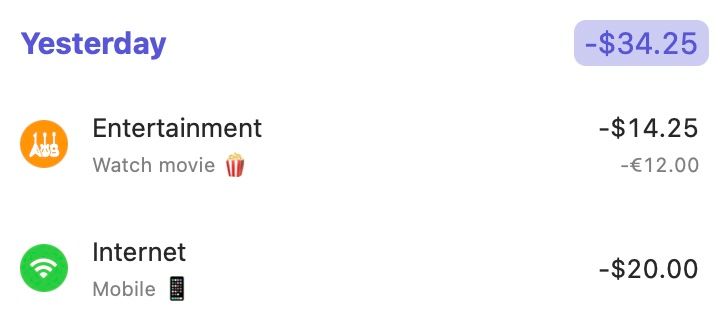
In the example above, the sheet is set to USD. The first expense (-€12.00) is in EUR, while the second expense (-$20.00) is in USD. The app will automatically convert the EUR expense to USD. The total amount on the sheet (-$34.25) is presented in USD.
Please note that the last currency you selected will be used for the next expense or income entry in that sheet.
Amount Precision
Expenses calculates totals and currency conversions with decimal amounts, including custom fixed exchange rates. This helps preserve the amount you entered when the app adds many small transactions or converts between currencies.
Displayed amounts still follow the normal formatting rules for each currency. For example, USD usually appears with two decimal places, while currencies without minor units may appear without decimals.
If you still have questions, we're here to help. Please get in touch and we'll respond shortly.